How do you sell something in a Facebook buy and sell group?
Open a group that has the buy and sell feature, click Sell Something, choose Item for Sale (or Vehicle, Home or Sale event), enter the details and post. In the same step you can add the item to other buy and sell groups you’re in and to Marketplace. Each copy is then edited, or marked sold, on its own.
Key facts
- 3 thingsa buy and sell group adds to a normal group: members can list items for sale, mark them as sold and search items to buySource: Meta Help Center.
- Admins onlycan add the buy and sell feature to a group, and only from the Facebook app: Meta says it isn’t available on computersSource: Meta Help Center; Meta Help Center.
- Adultsonly can buy, sell or see listings in a buy and sell group (Meta’s example: at least 18 in the United States)Source: Meta Help Center.
- 1 by 1every copy of the same item, in each group and on Marketplace, has to be edited or deleted separatelySource: Meta Help Center.
What is a buy and sell group?
Meta’s Help Center puts it in one line: “A buy and sell group is like a regular group, except it lets members: List items for sale. Mark items as sold. Search items to buy.” Groups focused on buying or selling are also “subject to our Commerce Policies and may have different features available for admins.”
You can only sell in a group whose admin has added the buy and sell feature: “You must be an admin of the group to add the buy and sell group feature.” Meta’s article on adding it says: “This feature isn’t available on computers”, so admins switch it on from the Facebook app.
How to post an item for sale in a group
- Open the group. On a computer, go to facebook.com/groups and select your group.
- Click Sell Something. It appears only in groups that have the buy and sell feature.
- Choose what you’re selling. Under Create new listing: Item for Sale, Vehicle for Sale, Home for Sale or Rent, or Sale event.
- Enter the details and click Next. Then choose where else the item should appear (next step) and post it.
On a phone the steps are shorter. Meta’s mobile text: “Tap What are you selling? at the top of the group. Enter the info about the item you’re selling and then tap Post.”
For Marketplace listings Meta says: “To mark an item as Free, you can enter 0 as the price.”
Posting the same item in more groups, and on Marketplace
Before you post, Facebook offers two extra places: “Post the item in other buy and sell groups you’re a member of” and “Create a Marketplace listing for the item.” You tick the groups you want, and Marketplace if you want it. Meta’s article doesn’t give a limit on the number of groups.
The catch comes later: “you’ll need to edit or delete each post in different buy and sell groups separately, even if they’re for the same item. If you created a Marketplace listing for the item, you’ll also need to edit the Marketplace listing separately.”
Posting as a Page changes one thing: “if you’re posting as a Page, you won’t see the option to create a listing on Marketplace.” We found no Meta article that says more about Pages selling in buy and sell groups.
Marking an item sold, editing it and listing it again
| You want to | Meta’s steps |
|---|---|
| Mark it sold | Select the group, click Your items, find your post, click Mark as sold |
| Sell it again | Your items, then the Sold tab, then Mark as available |
| Edit the listing | On the post, click Options, then Edit post, make your changes and click Post |
| Edit every copy | Edit or delete each group’s post and the Marketplace listing separately |
Meta adds that editing “is only available in select groups and countries.”
Source: Meta Help Center; Meta Help Center; Meta Help Center.What you can’t sell
Meta: “Items like animals, drugs, weapons, counterfeits and other items that infringe intellectual property rights aren’t allowed in buy and sell groups or on Marketplace.”
Its Commerce Policies cover anything that tries to “buy, sell, or trade products - even for free”, and say commerce content “may not promote the buying, selling, or trading of services, except on the WhatsApp Business app or through Appointments in Facebook or Instagram.” So promoting a service isn’t allowed in commerce content; a buy and sell group is for goods.
Listing from your computer with Group Posting
Since version 20.26.11.12 (November 2026), Group Posting can list an item for you in one of your buy and sell groups. You fill in the item once, in Compose’s Listing mode or the For sale library, and Group Posting sends it from your own signed-in browser.
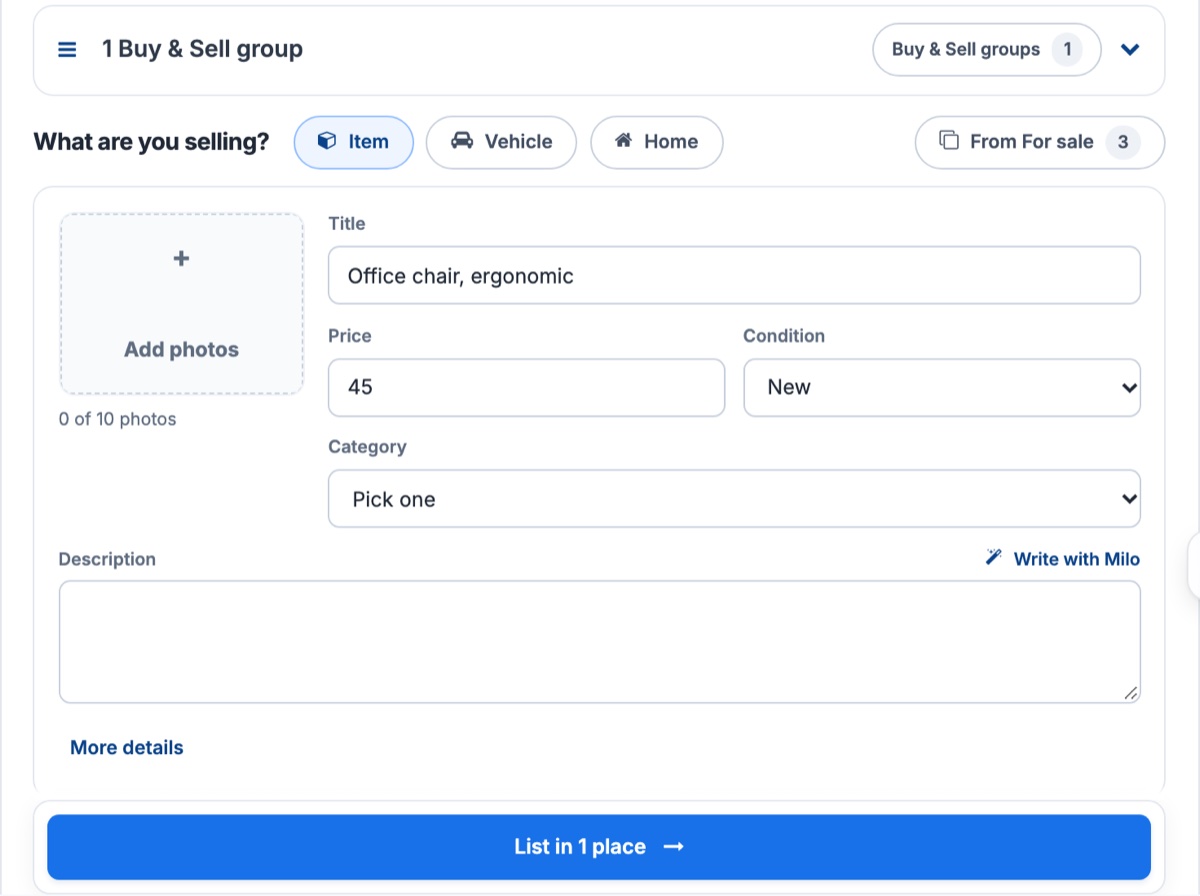
- Items only, for now. Vehicles and homes aren’t sent yet, and nor is Marketplace itself.
- One group per listing. Facebook lets you tick several; Group Posting sends each item to one buy and sell group for now.
- Up to 10 photos. An item with more is refused before anything is sent, so it never goes out with photos missing.
- A calm pace. At most 3 listings a day per Facebook profile, at least 4 minutes apart, and the same item isn’t sent to the same group twice within 24 hours.
- An honest result. Once Facebook accepts it, the listing shows as In review, and Group Posting looks once more about 3 minutes later.
- Plans. Plus lists 4 items a month and Pro has no plan limit; the free plan doesn’t list. See the plans.
How to cite
Group Posting, "How do you sell something in a Facebook buy and sell group?", groupposting.com/answers/sell-in-facebook-buy-and-sell-groups/, 22 November 2026.
You’re welcome to quote any figure here. Please name the original source we list beside it, and link to this page if it helped you find it.
Questions
Why don’t I see Sell Something in my group?
Only groups with the buy and sell feature have it, and only an admin can add that feature, from the Facebook app. Meta says it isn’t available on computers.
Can I post the same item in several buy and sell groups?
Yes. Before you post, Facebook lets you add other buy and sell groups you’re a member of, and Marketplace. Afterwards you edit, delete or mark each copy separately. Group Posting currently sends a listing to one group.
Can a Facebook Page sell in a buy and sell group?
Meta only says that a Page won’t see the option to create a Marketplace listing. We found no Meta article that says whether a Page can list in a buy and sell group itself.
How do I mark an item as sold?
On a computer, select the group, click Your items, find your post and click Mark as sold. To sell it again, open the Sold tab and click Mark as available.
Can I offer a service in a buy and sell group?
Meta’s Commerce Policies say commerce content may not promote buying, selling or trading services, except on the WhatsApp Business app or through Appointments in Facebook or Instagram.
Does Group Posting list cars and houses?
Not yet. It sends items for sale to one buy and sell group per listing. Vehicles, homes and Marketplace itself come later.
Sources
- How buy and sell groups differ from regular Facebook groups · Meta Help Center. Checked 22 November 2026.
- How to sell something in a Facebook buy and sell group · Meta Help Center. Checked 22 November 2026. Computer steps; the phone steps were read on the mobile version of the same article.
- Add the buying and selling feature to your Facebook group · Meta Help Center. Checked 22 November 2026.
- Mark something as sold in a Facebook buy and sell group · Meta Help Center. Checked 22 November 2026.
- Edit your listing in a Facebook buy and sell group · Meta Help Center. Checked 22 November 2026.
- Sell something on Facebook Marketplace · Meta Help Center. Checked 22 November 2026.
- Commerce Policies · Meta. Checked 22 November 2026.
How we keep this page current
We re-read every Meta Help Center article on this page every three months, and the day Group Posting’s listing feature changes (for example when vehicles or homes are added). Meta often has different steps for computers and phones; each step here says which one it is.
We make Group Posting, a Chrome and Edge extension for posting to the Facebook groups you have joined. Where this page names other products, the facts come from their own pages on the date shown; features and prices change, so check them before you decide.