Facebook Giveaway Rules for Groups
- Facebook groups
- Giveaways
- Compliance

You can run a giveaway in a Facebook group if you follow Meta’s promotion policy: publish official rules, make every entrant release Meta and acknowledge that Meta does not sponsor the promotion, and never require or reward sharing, reposting or tagging. Also check the group’s own rules, because many groups ban giveaways, and ask the admins before you post.
Meta’s Pages, Groups and Events Policies put the legal responsibility on you: you must make sure the promotion “complies with applicable legal and regulatory requirements”. This guide turns the policy into a checklist, a 14-day plan and three post templates. It is general information, not legal advice. Sources were checked on 28 October 2026.
1. Facebook giveaway rules: what Meta’s policy says
The “Promotions” section of Meta’s Pages, Groups and Events Policies covers a contest, giveaway or sweepstakes announced or administered through a Page, group or event (Meta: Pages, Groups and Events Policies). Read in plain English, it asks for five things:
- Follow the law. You must comply with applicable legal and regulatory requirements, such as giving entrants a copy of the official rules, disclosing the offer terms and eligibility requirements, and registering the promotion with the relevant authorities.
- Get a release. You must require participants to fully release and hold Meta harmless from liability.
- Say that Meta is not involved. Participants must acknowledge that the promotion is in no way sponsored, endorsed or administered by, or associated with, Meta.
- Do not reward sharing. Your promotion “must not require or incentivize participants to share, repost, tag others, or in any other way publicize” it.
- Take responsibility. Meta will not help you administer the promotion, and if you use its services to do so, you do so at your own risk.
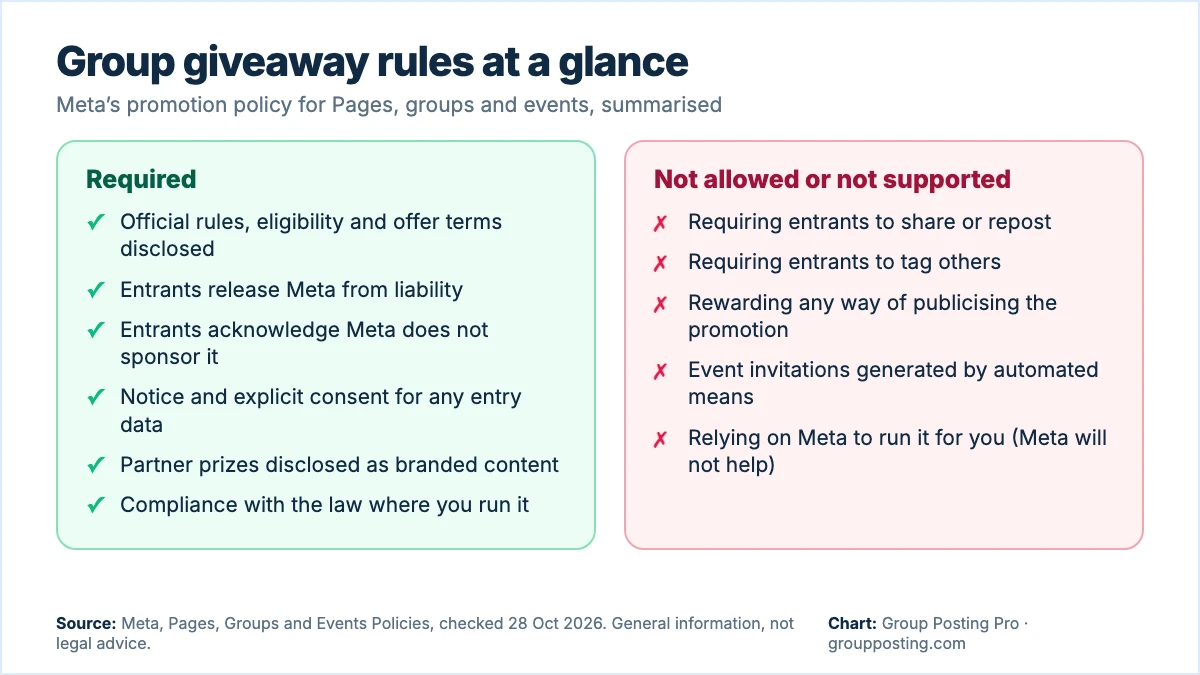
The same policy has two more rules that matter for giveaways. If you collect information from the people who interact with your Page, group or event, you must first give them notice, they must explicitly consent, and you must explain that you, not Meta, are collecting it. And if you are given anything of value to promote someone else’s products or services, you must follow Meta’s Branded Content Policies and disclose the commercial nature of the content.
Meta’s policy text does not mention comments as an entry method, so “comment to enter” is not named as banned. Treat that as a point to check on the live policy, not as permission, and remember that the group’s rules come first.
2. Ask the group first
Meta’s policy is the floor. A group can be stricter. Many groups ban giveaways, restrict promotion to a thread or require admin approval, and Facebook’s help pages note that admins can restrict post types and require approval for posts (Facebook Help: post in a group). Before you plan a prize:
- Read the group’s rules and any pinned posts about promotion.
- Message the admins with the details: what the prize is, the dates, the entry method and a link to the official rules.
- Offer to run the giveaway in a thread they choose, or to donate a prize for a draw that they run.
Our guide to Facebook group rules explains how to read the layers of permission, and the free group post checklist covers the check before each post.
3. Write the official rules
Official rules are a short page on your own website. They are also the easiest way to meet Meta’s requirement to disclose terms and eligibility. A short set should say:
- Who runs the promotion (your business name and contact details).
- The prize and its value, and what the winner has to do to receive it.
- Who may enter, such as age and location, and who may not.
- The start and end dates and the time zone.
- How to enter, in one sentence, and the limit on entries.
- How the winner is chosen (for example, a random draw) and how and when they are told.
- A release of Meta and a statement that Meta does not sponsor, endorse or administer the promotion.
- What happens to the entry data you collect, and who collects it.
Promotion laws differ by country and, in the U.S., by state. Rules on registration, bonding, whether a purchase can be required and what counts as a lottery vary, so ask a promotions lawyer before you offer a large prize. A safe default is that entering is free and needs no purchase.
4. Entry methods that fit the policy
| Entry method | Fit with Meta’s text | Notes |
|---|---|---|
| “Share this post to enter” | Not allowed | The policy bans requiring or incentivising sharing or reposting. |
| “Tag two friends to enter” | Not allowed | The policy bans requiring or incentivising tagging others. |
| Answer a question in the comments | Not named in the policy | Check the live text and the group’s rules. Keep the question about the prize, not about promoting you. |
| Fill in a form on your own site | Allowed with notice and consent | Tell entrants what you collect and why, ask for explicit consent and say that you, not Meta, are collecting it. |
| Message the group admin | Not named in the policy | Slower, and admins may not want the extra work. |
The practical lesson is that a form or a simple comment is safer than anything that spreads the post. If you want more people to see the giveaway, ask the admins whether they can feature it, and post in the groups where the rules allow it.
Scroll diagram horizontally →
5. Prizes from partners
If a partner gives you the prize, or you are given anything of value to promote their products, Meta’s policy says to follow its Branded Content Policies and disclose the commercial nature of the content. In the U.S., the FTC’s guidance also asks for clear disclosure of any material connection, close to the claim and in plain words (FTC: Disclosures 101 for Social Media Influencers). So a post such as “Giveaway with our partner [name], who provided the prize” is better than a vague hashtag. Do not name a customer or partner without their written permission.
6. A 14-day plan
| Days | Step | Detail |
|---|---|---|
| 1–3 | Prepare | Choose the prize and dates, write the official rules, set up the entry form with a consent line, check the law for your country. |
| 4–5 | Ask | Message the admins of each group with the details. Do not post until they say yes. |
| 6 | Announce | Post the giveaway in each group that agreed, with its own wording and the rules link. |
| 7–11 | Run | Reply to questions, remind members once in each group and keep the post tidy. Do not message people unasked. |
| 12 | Draw | Close entries, draw at random and record how. |
| 13 | Announce the winner | Post the result with the winner’s permission, thank everyone and say when the prize will be sent. |
| 14 | Deliver and review | Send the prize, confirm receipt and note which groups produced entries. |
7. Three post templates
Write each group its own version. Keep the prize, dates and rules link the same and change the opening.
Announcement. “We are giving away [prize] to one member of this group, with the admins’ OK. To enter, answer this in the comments: [question]. Entry is free and needs no purchase. It runs from [date] to [date], and the official rules, including who can enter, are here: [link]. This promotion is not sponsored, endorsed or administered by Facebook.”
Reminder. “A reminder that our giveaway closes on [date]. Entry details and the rules are in the first comment. Thank you to the admins for allowing it.”
Winner. “Our winner, drawn at random on [date], is [name, with permission]. Congratulations, and thank you to everyone who took part. We will be in touch with the winner by [method].”
Do not copy the same text into every group. Repeated wording is a common reason for duplicate-content flags, which how to avoid duplicate post flags explains. For a longer sequence, see how to write a Facebook group campaign brief.
8. What not to do
- Do not require shares, reposts or tags. Meta’s policy says not to require or reward them.
- Do not generate event invitations by automated means. Meta’s policy says event invitations must not be generated by automated means. Keep any outreach manual and relevant.
- Do not collect data without notice and consent. An entry form needs a clear statement of what you collect, why, and that you are the one collecting it.
- Do not change the rules halfway. If you must, post the change in every group and update the official rules.
- Do not pick the winner by hand. Use a random method and keep a record.
- Do not hide a partner. Disclose who provided the prize.
Also measure what you ran. Add a tracking tag to the rules link in each group, so you can see which groups produced entries. The free UTM builder and our guide to tracking social media leads with UTM parameters show how.
Frequently asked questions
Can I run a giveaway in a Facebook group?
Yes, if the group’s rules allow it and you follow Meta’s promotion policy: official rules, a release of Meta, a statement that Meta does not sponsor the promotion and no required sharing, reposting or tagging. Ask the admins first.
Can I ask people to share or tag friends to enter?
No. Meta’s Pages, Groups and Events Policies say a promotion must not require or incentivize participants to share, repost, tag others or otherwise publicize it.
Do I need official rules for a Facebook giveaway?
Meta’s policy asks you to comply with legal requirements, including giving entrants the official rules and disclosing the terms and eligibility. A short rules page on your own website is the simplest way. Ask a lawyer for large prizes.
Can I collect emails from entrants?
Only with notice and explicit consent. Meta’s policy says you must tell people what you collect, get their consent and explain that you, and not Meta, are collecting it.
Is “comment to enter” allowed?
Meta’s policy text does not name comments as banned or approved. Check the live policy and the group’s rules, keep entry free and do not reward sharing or tagging.
Sources
- Meta: Pages, Groups and Events Policies, checked 28 October 2026.
- Facebook Help Center: post in a Facebook group, checked 28 October 2026.
- FTC: Disclosures 101 for Social Media Influencers, November 2019.
Part of Running and growing a Facebook group, our topic page with every guide on this subject. Start with the main guide: How to Grow a Facebook Group: A Four-Week Plan.
For the group-publishing part of your workflow, explore campaigns and scheduled posting, or compare plans on Group Posting pricing.