Lead Magnet Examples for Facebook Groups
- Facebook groups
- Lead magnets
- Resource planning

A useful Facebook group lead magnet is a free resource that helps members complete one specific task, offered only where the group permits that kind of business contribution. Give readers a useful answer in the post, explain what the resource contains and make the delivery conditions clear. Keep a request for the resource separate from any optional next conversation or ongoing marketing choice.
This guide provides eight practical resource ideas, a delivery comparison, a seven-day creation plan and illustrative templates. Sources were checked on 31 October 2026.
Lead magnet examples: what the data says about conversion and consent
Conversion research provides context for a resource landing page, while permission determines what you can do with the information someone supplies. Measure those separately.
- There is a published landing-page benchmark: Unbounce’s 2024 Conversion Benchmark Report gives a 6.6% median conversion rate across industries. Its dataset covers more than 41,000 landing pages, 464 million unique visitors and 57 million conversions on its platform. These are landing-page actions, not a Facebook group lead-magnet success rate.
- Readable copy is associated with different rates: Unbounce’s same report reports 11.1% for pages written at US grades five to seven, compared with 5.3% for professional-level language. This is an observed association across its dataset, rather than proof that changing vocabulary causes that improvement.
- UK marketing needs its own checks: the ICO’s PECR electronic-mail guidance explains specific consent for marketing to individuals, subject to a limited existing-customer exception. It also requires a valid contact address for opting out. The ICO flags the guidance as under review; check it before a campaign.
- EU consent has defined conditions: Your Europe’s GDPR guidance, checked by its publisher in August 2026, describes freely given, specific, informed and unambiguous consent through an affirmative action. This applies when consent is the processing basis.
Use the benchmarks to frame your own measurement. Keep a resource request separate from an optional marketing choice; neither these rates nor a completed download establishes permission for ongoing contact.
1. Choose one reader task
Start with a question that appears in a relevant group. Someone comparing quotes needs comparison criteria; someone arranging product photographs needs a shoot brief. A general brochure about your business does not perform the same job as a worksheet that helps a person make progress.
Write the resource promise as an observable task: “Use this sheet to list the rooms and tasks you want included.” Avoid promises about future bookings, earnings or personal results. The useful output should be something the reader can inspect, such as a completed brief, a list of questions or a clearer choice.
Then define the boundary. A blank quote-comparison sheet organises information; it does not establish which provider is suitable for a particular job. A photography brief helps describe an assignment; it does not replace agreement on deliverables and image use. Explain what the resource does and what remains to discuss.
Check group permission before making the resource. The rules may distinguish advice, business links, research and free offers. A free download can still be promotion. If the rules allow only a designated thread, use it; if the proposed delivery method is unclear, ask an admin first.
2. Eight useful resource ideas
These are illustrative ideas, not tested conversion claims. Make the resource yourself, check the instructions and adapt it to the audience. The delivery options below are choices to evaluate against the actual group rules.
| Business niche and task | Resource and output | Delivery | Permission to check |
|---|---|---|---|
| Cleaning: describe the work | Room-and-task sheet; a completed cleaning brief | Blank image or ungated document | Business advice and resource sharing |
| Photography: brief a shoot | Product shot-list sheet; items, views and intended uses | Printable sheet at a direct link | Relevant business links |
| Salon: choose a first step | Appointment question card; questions for the practitioner | In-post checklist or document | Provider education and resource offers |
| Café: plan a small meeting | Venue brief; headcount, timing and facility questions | Ungated planning sheet | Local venue resources |
| Trade service: compare quotes | Scope comparison grid; inclusions and unanswered questions | Blank spreadsheet or printable grid | Business resources and links |
| Repair service: prepare a handover | Item-history form; model, symptoms and previous work | Document without private account fields | Relevant preparation guidance |
| Florist: describe an event | Event brief; spaces, preferences and delivery arrangements | Printable worksheet | Supplier resources and promotion format |
| Craft retailer: record dimensions | Measurement note; dimensions to check before enquiring | In-post diagram and optional document | Retail advice and resource links |
For the cleaning sheet, separate the rooms from the actual tasks. For the photography brief, leave space for intended image use instead of assuming every buyer needs the same deliverables. The output should help a reader speak to any suitable provider, even if they never choose yours.
The salon card should list appointment questions without assessing individual treatment suitability. The café sheet can prompt people to confirm the actual venue arrangements. The repair form should avoid passwords or private account information; those do not belong in a marketing resource request.
For the comparison grid, include a column for missing information so the reader can ask about it. The florist and craft worksheets can make preferences and measurements visible without pretending that a blank form is a final specification. Use your professional scope to decide where further assessment belongs.
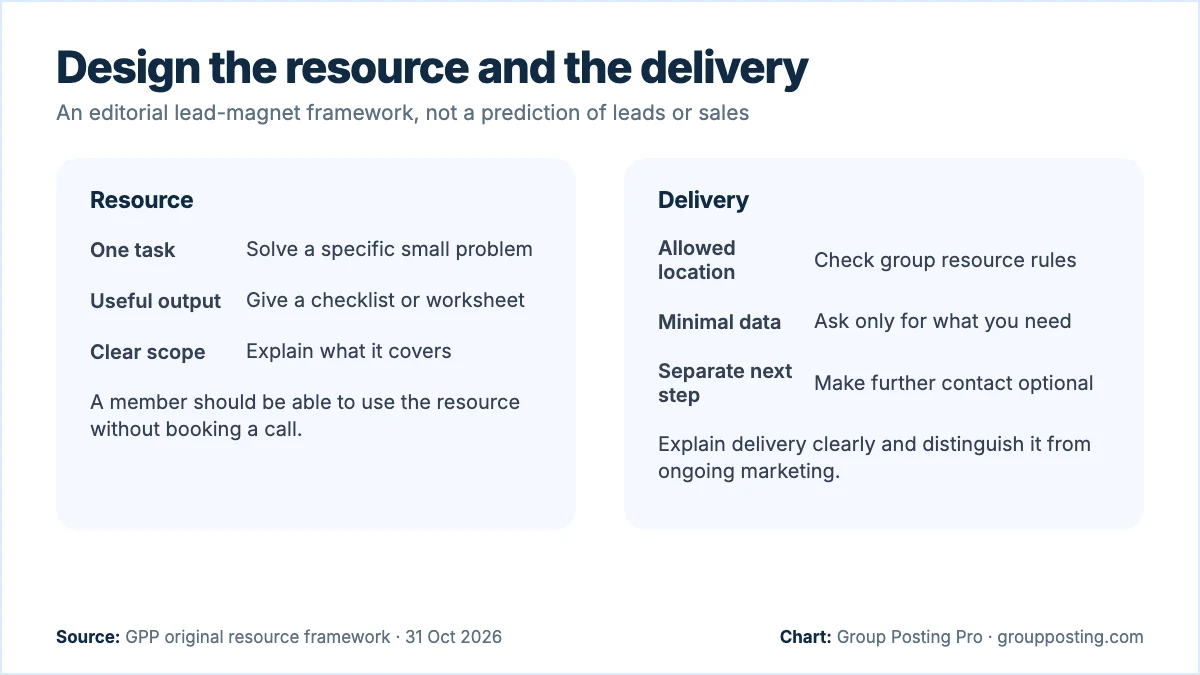
3. Choose a clear delivery route
Ungated link: the person opens the resource without supplying an email address. Use a direct, descriptive destination and check that it works on a phone. If links are not allowed, give the useful content in the post or use another permitted channel.
Requested private delivery: the person asks you to send a specific resource through an agreed channel. Send that resource, identify it and stop there unless they request more. Do not send messages to everyone who reacted or treat a public comment as agreement to unrelated outreach.
Clearly explained email delivery: before asking for an address, say who collects it, why it is needed and what will be sent. Keep any ongoing marketing choice separate in your operating process. Ask for only the information needed to deliver the resource and explain the relevant privacy information.
Meta’s Pages, Groups and Events Policies require notice, explicit consent to the use of collected information and clarity that you, rather than Meta, collect it. A group’s permission for a resource post does not complete those information and consent steps for you.
4. Create and test it in seven days
This is an illustrative creation schedule, not a demand forecast or a required publication cadence. Choose one idea first. A clear one-page worksheet may be more useful than a long guide that postpones the task the reader wanted to complete.
- Day 1: define the task. Write the reader question, the output and the scope boundary. Check the intended group’s rules before deciding how the resource will be offered.
- Day 2: draft the smallest useful version. Include the actual steps or fields needed. Add brief instructions and distinguish a blank worksheet from an illustrative filled example.
- Day 3: verify the content. Check factual statements, links, calculations and any professional boundaries. Remove claims about outcomes you cannot support. Keep personal information out of examples.
- Day 4: try the task yourself. Complete the worksheet using clearly labelled illustrative inputs. Check whether the instructions produce the promised output without additional explanation.
- Day 5: inspect the delivery. Open the resource on a phone and desktop. Check access conditions, file readability, notice wording and the exact information a delivery form requests. Do not publish until the route is clear.
- Day 6: offer it in a permitted place. Give a useful part of the answer in the post. Explain the contents and conditions. If approval is pending, wait and inspect the result instead of submitting duplicates.
- Day 7: review questions and revise. Note confusing instructions, failed access and requests for missing information. Improve the resource before repeating the offer in another suitable destination.
Use a version date and a contact route for corrections. If an external fact changes, update both the resource and any post that described it. Save the facts and group context with the draft so later reuse does not depend on remembering why the original wording fitted.
5. Three resource templates
All three templates below are illustrative. Replace the brackets with facts and follow the group’s format. Do not require a share, tag or reaction as payment for a useful answer. A clear link, where permitted, can be simpler than asking people to comment a keyword.
An ungated resource offer
Illustrative template: “Comparing [options]? Start by checking [useful criterion]. I provide [service] and made a blank [resource] to help organise [task]. It includes [contents] and leaves you with [output]. You can open it without an email form here: [permitted link]. It does not replace [scope boundary].”
Use this where business resource links are allowed. Make the first instruction useful without a click. If the promised output cannot be explained plainly, simplify the resource before promoting it.
Delivery of a requested resource
Illustrative template: “You asked for the [resource] through [agreed channel]. Here it is: [file or link]. Start with [first step]. This message delivers the item you requested; there is no further action needed. If a part is unclear, you can ask about that.”
Send it only in response to a real request and through the agreed route. Check the file and link before sending. Do not attach an unsolicited sales sequence to a simple delivery message.
A separate optional service step
Illustrative template: “The worksheet helps you organise [task] yourself. If you would like help with [separate service scope], I provide [service]. The next step is [permitted enquiry route], where we can check whether the work fits. Using the resource does not require an enquiry.”
Use this only where the group or existing conversation permits a commercial next step. Keep the resource useful on its own instead of withholding its final instructions until someone asks about paid help.
6. Offer an optional next step
Respond to the question the person actually asks. “Where do I find the file?” needs a working link, not a consultation invitation. “Can you help me complete this?” may justify explaining your service and asking whether they want further details.
For UK electronic marketing, the ICO’s electronic mail marketing guidance explains consent requirements and limited exceptions. Check the rule that applies to your recipient and situation instead of assuming a resource request establishes permission for continuing marketing.
Keep a simple request record: resource/version, agreed delivery route, what was requested and whether delivery was completed. Record a service enquiry separately. Our outreach guide covers agreed conversations and follow-up in more detail.
7. Review usefulness and effort
Separate visible posts, resource access, delivery requests, service enquiries and confirmed business outcomes. A download is not a customer. Where the evidence is incomplete, say so; an ungated document may help someone without producing an identifiable record.
Review access problems, repeated questions and delivery time alongside any enquiries. If readers cannot complete the task, fix the instructions. If the resource attracts unrelated requests, clarify who it is for. If delivery creates more manual work than you can handle, consider an allowed direct link.
The group post writing guide helps with the draft, while Facebook group marketing covers the broader plan. Choose the next improvement from what readers need, rather than producing another download just to fill a calendar.
Frequently asked questions
What makes a useful Facebook group lead magnet?
A specific task, usable output and clear scope. It should help someone who never becomes a customer and belong in the group where you offer it.
Do I need an email form?
No. An ungated resource may be enough. If you choose email delivery, explain the information request and keep any further marketing choice clear and separate.
Can I send the resource privately?
Use a private channel when the person requested it and the group permits that route. Send the agreed item without assuming permission for unrelated promotional messages.
How many resources should I create first?
Start with one useful resource and inspect the delivery and instructions. The eight ideas are alternatives to choose from, rather than a production target.
What should I measure?
Track access problems, completed delivery requests, useful questions and separate service enquiries. Keep downloads and actual customers in different categories.
Sources
- Meta: Pages, Groups and Events Policies, information collection, checked 31 October 2026.
- ICO: electronic mail marketing, UK guidance, checked 31 October 2026.
- Group Posting Pro: campaign builder, publishing workflow and plan allocation, checked 31 October 2026.
- Unbounce: 2024 Conversion Benchmark Report, 2024 edition; checked 31 October 2026.
- Your Europe: Data protection under GDPR, publisher last checked 5 August 2026; checked 31 October 2026.
Part of Facebook group marketing and leads, our topic page with every guide on this subject. Start with the main guide: Facebook Group Marketing: A Practical Business Guide.
For the group-publishing part of your workflow, explore Campaign builder, or compare plans on Group Posting pricing.