Facebook Post Ideas for Groups: 20 Examples and Templates
- Facebook groups
- Post templates
- Content planning

Choose a Facebook group post template by its purpose and the group’s rules, then replace every bracket with accurate details for that community. Useful business posts can teach a small task, invite a relevant discussion, share an allowed resource or make a clearly labelled offer. A template saves drafting time; it does not give permission to promote or turn a member’s reply into consent for private sales messages.
This library contains 20 illustrative fill-in templates, the permission each needs and a short adaptation checklist. Sources were checked on 31 October 2026.
Facebook post ideas for groups: what the evidence says about useful formats
Choose a format around what members can contribute. The available research is about community value, rather than a conversion rate for any particular template.
- Online communities can matter deeply: NYU’s February 2021 GovLab report announcement says that, in 11 of 15 surveyed countries, a majority named primarily online communities as their most meaningful communities. YouGov surveyed 15,000 people already belonging to online and in-person communities; the finding does not represent everyone or only Facebook users.
- Photos can invite participation: Meta’s October 2020 announcement described collaborative photo prompts organised around a topic. A useful adaptation is an optional invitation to share a relevant example, with image rights checked.
- Questions have a dedicated use: the same Meta announcement described admin-hosted text Q&A sessions. This supports planning a bounded discussion with someone available to answer.
- A question may receive different presentation: Meta’s July 2021 announcement described automatically presenting question-like posts in a format inviting advice and perspectives.
These are dated format announcements, not a promise that your group currently offers every control. Check the composer and admin rules before adapting a template. None of the findings gives permission for promotion, private messages or collecting members’ details.
1. Choose by purpose and permission
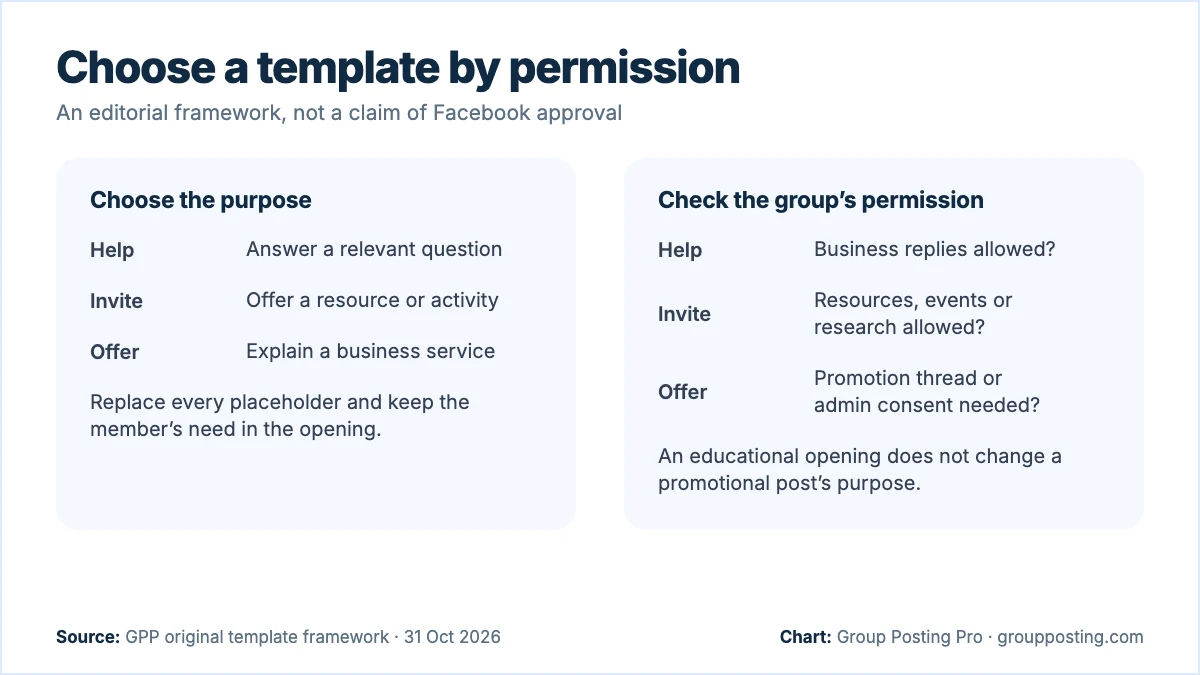
Read the rules, featured information and the actual thread before choosing words. Permission for general discussion does not necessarily include surveys, links or offers. If the rules are unclear, ask the admin about the specific activity. Put an offer in the designated promotion thread when that is the permitted place.
| Purpose | Permission to check | Templates |
|---|---|---|
| Help | Relevant advice from businesses | 1–6 |
| Discuss | Questions, research or polls | 7–10 |
| Invite | Resource links or event promotion | 11–13 |
| Offer | Commercial posts in the chosen place | 14–17 |
| Reply | Provider replies and the requested next step | 18–20 |
The permissions below are checks for your workflow, not statements that Facebook grants those permissions. A group can allow one format and decline another. For the wider process, read Facebook group marketing; use this page when you need an actual starting draft.
2. Templates 1–6: give practical help
Replace the placeholders with advice you can support. Keep the useful answer in the post so readers do not have to request a message to receive the promised help. Remove the optional question if the topic needs no discussion.
1. A three-step checklist
Permission needed: Relevant business advice. Use when: A repeated task causes confusion.
Illustrative template: “Before [task], check [step one], [step two] and [step three]. Start with [first check] because [reason]. I provide [service], and this is a general preparation checklist.”
Optional next step: Ask which step needs explanation.
2. A comparison checklist
Permission needed: Advice and comparisons. Use when: People compare unlike options.
Illustrative template: “Comparing [option A] with [option B]? Check [criterion], [criterion] and [criterion] in both descriptions. [Difference] matters when [situation]. I work in [field]; neither choice fits every situation.”
Optional next step: Invite a question about the criteria.
3. Explain one term
Permission needed: Educational business contributions. Use when: A technical word blocks a decision.
Illustrative template: “[Term] means [plain definition]. In [task], it affects [practical detail]. Ask a provider [useful question] before deciding. I work in [field], so I wanted to explain the wording.”
Optional next step: Offer another definition publicly.
4. Correct a common mistake
Permission needed: Practical advice from providers. Use when: You can explain a specific error.
Illustrative template: “When doing [task], [mistake] can cause [verified consequence]. Instead, try [appropriate step]. This applies to [scope]; [exception] needs individual assessment. I provide [service] in [area].”
Optional next step: Ask whether the distinction is clear.
5. Explain a work sample
Permission needed: Business work samples and your image rights. Use when: A detail is easier to show.
Illustrative template: “Illustrative demonstration: this [object or diagram] shows [detail]. Notice [observable feature]. For [task], check [criterion]. It is a demonstration, rather than a customer result. I provide [service].”
Optional next step: Answer questions about the method.
6. A dated local update
Permission needed: Relevant local information from businesses. Use when: You have checked a current change.
Illustrative template: “For anyone planning [local activity] on [date]: [verified change]. The current details are at [permitted source link]. I work in [related field]. Recheck the source before travelling or booking.”
Optional next step: Omit the link if links are not permitted.
3. Templates 7–10: invite a real discussion
A question should serve the discussion you describe. Do not use a poll as a disguised sales list. Explain your business role and how you will use answers; avoid collecting personal or sensitive information in public.
7. Ask about a practical choice
Permission needed: Business-led discussion questions. Use when: There is no single correct preference.
Illustrative template: “For [task], which matters more to you: [factor A] or [factor B], and why? I provide [service] and am interested in the trade-off. General preferences are enough; please leave personal details out.”
Optional next step: Discuss the reasons without pitching.
8. An explicit research question
Permission needed: Commercial research and admin agreement. Use when: You need input on a defined issue.
Illustrative template: “With admin agreement, I’m researching [topic] for my [business type]. What information would help you compare [choices]? I’ll use general themes to improve [resource]. Please avoid private details; replying is optional.”
Optional next step: Explain any further research separately.
9. A simple planning poll
Permission needed: Polls and business research. Use when: A choice will inform a real plan.
Illustrative template: “I’m planning [resource] for [audience]. Which topic would be most useful: [A], [B] or [C]? I provide [service]. This helps choose the topic; voting does not subscribe you to messages.”
Optional next step: Publish the useful resource if permitted.
10. Feedback on a draft resource
Permission needed: Business feedback requests. Use when: You have a real draft to discuss.
Illustrative template: “I’ve drafted this [short checklist] for [task]: [actual points]. I provide [service]. Which instruction is unclear or missing context? I’m asking about the resource, rather than seeking enquiries.”
Optional next step: Thank contributors and explain revisions.
4. Templates 11–13: share resources and invitations
Share what exists, describe what it contains and make the access conditions clear. Meta’s Pages, Groups and Events Policies require notice, explicit consent and clarity about who collects information. Do not quietly add resource requests to an ongoing mailing list.
11. An ungated resource
Permission needed: Relevant resource links from businesses. Use when: A checklist answers an existing need.
Illustrative template: “I made a [resource] covering [specific task]. It includes [contents] and is available without an email form at [link]. I provide [service]. Here is one useful step from it: [step].”
Optional next step: Invite questions in the thread.
12. A question-session invitation
Permission needed: Business sessions and event promotion. Use when: You can host the promised session.
Illustrative template: “I provide [service] and will answer general questions about [topic] on [date, time, zone] at [permitted place]. It covers [scope], excluding [boundary]. Participation is [actual access conditions]. Please keep personal information private.”
Optional next step: Link only to the permitted details page.
13. Clear event information
Permission needed: Local event promotion. Use when: The event details are confirmed.
Illustrative template: “I’m organising [event type] for [audience] at [place] on [date, time, zone]. It includes [activities]. Attendance requires [actual booking steps and costs]. Access information and full terms: [permitted link].”
Optional next step: Answer practical attendance questions.
5. Templates 14–17: describe a business offer
Use these only where promotion is welcome, including any required thread or approval. Fill in genuine availability and scope. Keep the offer factual without making claims about future customers, earnings or results.
14. A clear service introduction
Permission needed: Commercial introductions in the chosen thread. Use when: The audience needs your service.
Illustrative template: “I provide [service] for [audience] in [area]. The work includes [scope] and excludes [boundary]. If you need help with [specific task], [permitted contact route] has the process and current details.”
Optional next step: Invite a service-fit question.
15. Current availability
Permission needed: Availability promotions. Use when: Your diary has been checked.
Illustrative template: “As of [date], I have availability for [service] during [genuine window] in [area]. Appointments depend on [actual condition]. I provide the service; use [permitted route] to check whether your task fits.”
Optional next step: Recheck the diary before replying.
16. Explain service scope
Permission needed: Commercial service explanations. Use when: People need to understand inclusions.
Illustrative template: “Our [service] covers [included tasks]. It does not include [exclusions]. Before requesting details, check [prerequisite]. I provide this service in [area]; the next step is [permitted enquiry route].”
Optional next step: Answer questions without assuming a booking.
17. Show a blank process sample
Permission needed: Business demonstrations and commercial links. Use when: You can show a real blank worksheet.
Illustrative template: “This blank [worksheet] shows how I organise [service task]: [stages]. It contains no customer information. I provide [service]; the sample explains the process rather than predicting an outcome. [Permitted resource route].”
Optional next step: Offer a public explanation of one stage.
6. Templates 18–20: respond to an existing request
Read the whole request before adapting a reply. If someone wants independent recommendations, your own offer may not fit. Our outreach guide develops the conversation and follow-up process.
18. A transparent provider reply
Permission needed: Self-recommendations and provider replies. Use when: The request matches your scope.
Illustrative template: “For [stated need], check [useful criterion] before choosing. I provide [service] in [area], so this is my own business. We handle [relevant scope]. If you want details, [permitted next step].”
Optional next step: Let the requester choose whether to continue.
19. One clarifying question
Permission needed: Relevant business replies. Use when: One missing fact determines fit.
Illustrative template: “For [task], is [non-sensitive detail] already decided? It changes whether [option] fits. I provide [service]. You can answer generally here; no private documents or contact details are needed.”
Optional next step: Give the answer when clarified.
20. A requested follow-up
Permission needed: Provider replies and that person’s agreed follow-up. Use when: You owe a specific promised action.
Illustrative template: “Following up on your request for [information]: [actual answer or update]. The remaining detail is [point]. If you want to continue, [agreed next step]. If your plans changed, I can close my note.”
Optional next step: Use only the agreed channel and scope.
7. Adapt, check and save
These templates contain no results claims or testimonials to borrow. Add your own verified details without inventing experience. Meta’s policy requires commercial disclosure when you receive something of value to promote another business. A partner-funded resource therefore needs a clear explanation of that relationship as well as group permission.
- Choose one purpose. Help, discuss, invite, offer or reply.
- Check the permission. Include identity, format, links and the designated location.
- Fill every bracket. Delete any sentence you cannot support.
- Adapt the substance. Use this audience’s task and vocabulary.
- Review the next step. Keep it optional and within the permission given.
- Save the finished draft. Record the group, date and facts that will need rechecking.
For a detailed writing method, read how to write Facebook group posts people can use. An AI draft still needs the same factual review. Do not approve new claims simply because they sound polished.
Frequently asked questions
Can I copy these Facebook group templates?
Yes. Replace the brackets with verified details, choose a permitted purpose and adapt the explanation to the community. Remove any next step that the rules do not allow.
What should a business post in a Facebook group?
Start with a relevant answer or discussion. Share resources or offers only where permitted. The selection table helps match the purpose to the permission you need.
Should every post include a business link?
No. A useful explanation can stand alone. Include a link only when it adds value and is allowed in that location, including comments.
Can I use these templates for comments?
Use the reply templates for genuine requests where provider participation is allowed. Read the thread and answer the stated question before suggesting any further step.
How often should I reuse a template?
There is no universal schedule. Check whether the audience still needs it, whether the facts changed and what the rules permit. Reuse the structure while adapting the substance.
Sources
- Meta: Pages, Groups and Events Policies, information collection and branded content, checked 31 October 2026.
- Group Posting Pro: AI content engine, product workflow and plan allocation, checked 31 October 2026.
- NYU Tandon: The GovLab report on online communities and their leaders, February 2021; page posted 23 February, release dateline 24 February; checked 31 October 2026.
- Meta: Supporting Online Communities When They’re Needed Most, 1 October 2020; checked 31 October 2026.
- Meta: New Ways to Elevate Experts in Facebook Groups, 13 July 2021; page also shows 14 March 2022 update; checked 31 October 2026.
Part of Posting to Facebook groups, our topic page with every guide on this subject. Start with the main guide: How to Post to Multiple Facebook Groups (2026 Guide).
For the group-publishing part of your workflow, explore AI content engine, or compare plans on Group Posting pricing.