Salon Marketing Ideas: Get Clients from Facebook Groups
- Facebook groups
- Salons and beauty
- Appointment planning

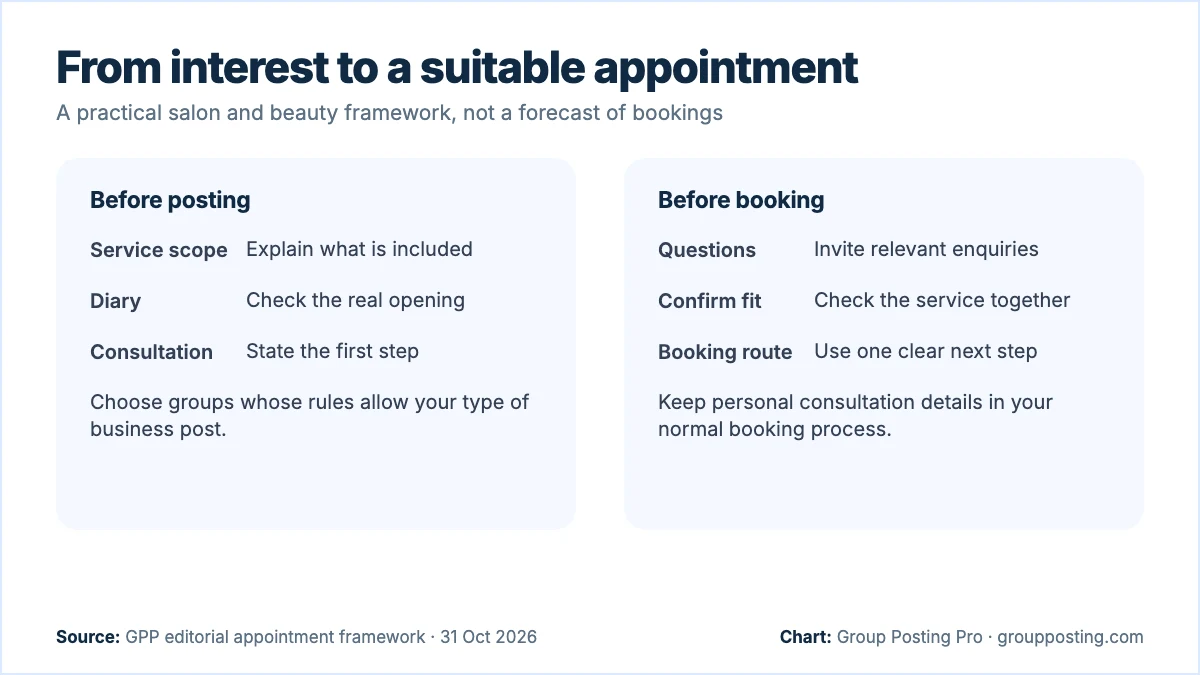
Use Facebook groups for a salon or beauty business by explaining a specific service, checking that promotion is permitted and offering a clear route to assess appointment fit. Confirm the actual diary, service duration and consultation process before mentioning availability. A useful post helps someone understand what to ask and how to book; it does not promise a transformation or treat every interested comment as a confirmed appointment.
This guide covers local group selection, a service comparison worksheet, a weekly campaign routine and illustrative post templates. Sources were checked on 31 October 2026.
Salon marketing ideas: what the data says about referrals and booking friction
Beauty-sector survey findings need careful labels: hair-salon guests and salon-and-spa regulars are different groups. These studies point to useful questions for your own enquiry and booking process.
- Personal recommendations matter for hair discovery: Phorest’s 2025 UK and Ireland report, page 25, says 61% rely on family and friends when discovering new hair salons. Its regional sample covered 716 hair-salon guests, rather than every type of beauty client.
- Online booking has an audience: the same Phorest report, page 19, found 45% preferred online booking and used it whenever possible. Fieldwork ran from 30 October to 13 November 2024, screening for a hair-salon visit within six months.
- Difficult booking can interrupt interest: Zenoti’s September 2025 survey report says 71% of salon-and-spa regulars had skipped a booking because reaching someone or using the online system was difficult.
- Appointment questions extend beyond opening hours: Zenoti’s report also says 81% of regulars called to manage appointments outside normal hours at least sometimes. The online survey covered 1,011 US adults; the published findings identify these percentages as regulars’ answers.
Both studies come from salon software vendors and describe reported behaviour. They do not measure Facebook group performance. Make recommendations easy to verify, explain the booking route and distinguish an enquiry from a confirmed appointment.
1. Choose the service before the group
Start with one service you can explain and deliver now. A haircut, an initial colour consultation and a nail appointment are different decisions. Group members need to know which one you mean before they can judge whether the post is relevant.
Then look for local conversations in your actual travel or venue area. Read recent requests, rules and featured information. A neighbourhood group may allow business posts only in a designated thread. An event-planning community may permit supplier introductions but have separate rules for availability posts. Record the format and location that apply to your exact contribution.
Keep your commercial role clear. A personal introduction from a practitioner is still business promotion when it contains a service offer. If the rules do not explain whether your proposed content belongs, ask an admin before posting. Do not assume that a helpful opening changes the permission needed for the offer that follows.
For a recommendation request, check whether providers may reply. Answer the stated need, identify your relationship to the salon and give a factual next step. A request for independent recommendations may call for a different response from a request for practitioners with availability.
Our photography guide covers portfolio-led enquiries, and our cleaning business guide covers service areas and task scope. This plan focuses on the salon-specific gap between interest in a service and a suitable appointment.
2. Make appointment scope clear
Write a service sheet for the person drafting posts. Include the service name, inclusions, exclusions, location, booking route and the practitioner who can confirm details. Keep consultation appointments distinct from the service appointments they may precede.
| Appointment | Scope to explain | Confirm before booking | Visual without people | Next step |
|---|---|---|---|---|
| Haircut | Actual cutting, finishing and consultation inclusions | Requested service and the time it needs | An empty station and a service checklist | Choose the matching service or ask for help |
| Colour consultation | What the discussion covers and what happens afterwards | Whether a separate consultation is required | Colour swatches labelled as examples | Request the consultation process |
| Nail appointment | The specific service and any separate removal step | Which appointment type and duration fit | Practice tips or a colour display | Use the current service-selection route |
| Beauty consultation | The service offered and its professional boundaries | Practitioner assessment and any prerequisites | A room layout or blank consultation outline | Contact the practitioner through the stated route |
Use your own real service definitions. These illustrative categories do not prescribe how a treatment should be performed. Any suitability checks belong in your professional process and applicable manufacturer instructions, rather than in a generic social caption.
Service duration deserves its own check. An open gap in the diary may fit one service without fitting another. Include the time needed for your actual preparation, consultation and finishing process when deciding which appointment can be offered. Do not publish a slot simply because an empty calendar block is visible.
3. Show useful visuals without people
A post does not need a client photograph to explain a service. Use your own colour display, practice nail tips, empty consultation space, tools arranged for a demonstration or a simple diagram of the booking process. Check the rights to the image and remove personal details from the background.
Label demonstration material accurately. A colour swatch is an example of a shade, not evidence that every person will receive an identical result. A practice design shows the design; it does not establish how long a particular appointment will take or whether it fits an individual’s needs.
Keep diary screens, contact details and consultation notes out of promotional images. Meta’s Pages, Groups and Events Policies require notice and explicit consent when collecting information from people interacting with a Page, group or event. Build a separate, clear process for any information you request instead of asking people to disclose personal circumstances under a public post.
4. Build a weekly campaign routine
A campaign can progress from introduction to explanation, genuine availability and a final update. That does not mean publishing four offers in every group each week. Some groups permit only one promotional thread; others may offer fewer opportunities. Spread the sequence across the allowed windows, even when it takes several weeks.
- Review the service and diary. At the start of the week, confirm which services you can take, their actual duration and any consultation step. Assign someone to approve changing facts.
- Choose one job for each post. An introduction explains who the service suits. An explanation answers a booking question. An availability update uses the current diary. A final update corrects or closes dated information.
- Match the permitted destination. Record the allowed format and day for every group. A new standalone post does not satisfy a rule requiring a comment in a promotion thread; handle that thread in the required way.
- Prepare the full sequence. Draft the wording and select a visual without people. Keep dates and service definitions consistent across drafts, but adapt the explanation to the community’s actual question.
- Check before each release. Reconfirm availability and the booking route. Pause a dated post if the service no longer fits the diary, or replace it with a useful explanation when that is permitted.
- Review the result and responses. Distinguish a visible post from a pending submission. Record the questions that need a practitioner’s answer and close outdated availability information promptly.
Group Posting’s campaign builder supports planned sequences of group posts with waits between steps. These are publishing steps, not appointment follow-up messages triggered by a guest’s personal circumstances. Review the destinations, timing and repetitions before starting the run.
Scheduled work requires an awake, online computer with Chrome open, the extension enabled and Facebook signed in. Keep someone available to inspect results and reply. A publishing calendar should fit around the salon’s service schedule instead of competing with time promised to guests.
5. Use three appointment templates
These illustrative fill-in templates describe possible posts, not customer experiences. Replace every bracket with checked facts. Use the appropriate promotion thread or admin-approved format, and remove a link or next step when the group does not permit it.
Introduce one salon service
Illustrative template: “Local business introduction for this thread: I provide [specific service] at [location]. The appointment includes [real inclusions] and does not include [important exclusion]. If you are unsure which service to choose, [actual consultation or question route]. The example image shows [swatch, practice design or empty space], rather than a client result.”
Use this when someone needs to understand the offer. A list of every treatment can make the next step harder to choose. Start with one service and explain how a person can find the right appointment type.
Explain a consultation
Illustrative template: “Considering [service] and unsure what to book? Our first step is [actual consultation process]. We discuss [non-clinical scope] and explain [next step]. A consultation is [accurate description], rather than confirmation of the later service. I provide this service at [location]. Details are available through [permitted route].”
Use the practitioner’s own process and professional boundaries. Do not invite health details in a public comment or turn a general caption into personal advice. Any private assessment should follow the established service process.
Explain genuine availability
Illustrative template: “As of [date], we have appointment availability for [specific service] during [checked window] at [location]. Suitability depends on [actual consultation or service-selection step]. Please use [booking route] for a current check and confirmation. A comment here does not reserve an appointment.”
Check the diary before posting and before answering a request. Do not invent a cancellation, remaining-slot count or deadline. When availability changes, update the information and any scheduled versions that refer to it.
6. Move from comment to booking
Answer the public question first. If someone asks whether you offer a service, confirm the actual scope and explain how appointment selection works. Ask only the minimum general question needed to choose the next step, such as whether they want a consultation or an existing service.
Let the person choose the private route when a consultation or booking needs further details. Make clear what you will send or ask. Interest in a swatch post is not agreement to a promotional message sequence. Our outreach guide explains permission-based first contact and follow-up.
Keep enquiry, provisional request and confirmed appointment as separate statuses. Confirm a booking only when your actual requirements are complete. Explain any preparation information, changes or cancellation process through your established booking route, without improvising professional instructions in a sales reply.
7. Review suitable appointments
Track the originating group, service requested, next step, appointment status and the time spent handling the enquiry. Keep reasons for unsuitable requests, such as location, service mismatch or unavailable timing. Avoid recording sensitive consultation details in a marketing spreadsheet.
Separate posts and reactions from service enquiries and completed appointments. Where appropriate, ask how the person found the salon; leave an unknown category when you cannot tell. A booking-page visit alone does not establish that a group post created a customer.
Review repeated questions before increasing activity. If people choose the wrong service, improve the scope explanation. If the diary cannot fit requests, revise the availability post. If appropriate enquiries stall, check whether the booking route clearly explains the next step. The useful improvement may be a clearer handoff rather than a larger campaign.
Frequently asked questions
Which Facebook groups should a salon consider?
Choose relevant local communities whose rules permit the proposed business contribution. Check actual conversations and the required promotion format rather than relying on membership totals.
What can a beauty business show without client photographs?
Use your own swatches, practice designs, empty spaces or explanatory diagrams. Label demonstrations clearly and avoid implying that a sample predicts an individual result.
Should a colour consultation have its own post?
It can, where permitted, when people need to understand that first step. Explain what the consultation covers and how it differs from booking the later service.
Can I post appointment availability?
Yes, where the group permits it and you have checked the diary. Name the service and current window, then use your actual process to assess fit and confirm bookings.
How should I count appointments from groups?
Keep enquiries, provisional requests and confirmed appointments separate. Record the stated source when available and do not count reactions or website visits as bookings.
Sources
- Meta: Pages, Groups and Events Policies, information collection, checked 31 October 2026.
- Group Posting: campaign builder, publishing sequences and operating conditions, checked 31 October 2026.
- Phorest: Consumer Insights Report 2025, UK and Ireland, 2025 edition; fieldwork 30 October–13 November 2024; checked 31 October 2026.
- Zenoti: 2025 survey on salon and spa appointment management, 12 September 2025; September 2025 fieldwork; checked 31 October 2026.
Part of Facebook groups for local businesses, by trade, our topic page with every guide on this subject. Start with the main guide: Free Local Business Advertising: Channels and a 30-Day Plan.
For the group-publishing part of your workflow, explore Campaign builder, or compare plans on Group Posting pricing.