Facebook Groups Integrations in 2026: What Still Works
- Facebook groups
- Automation
- Tool comparisons

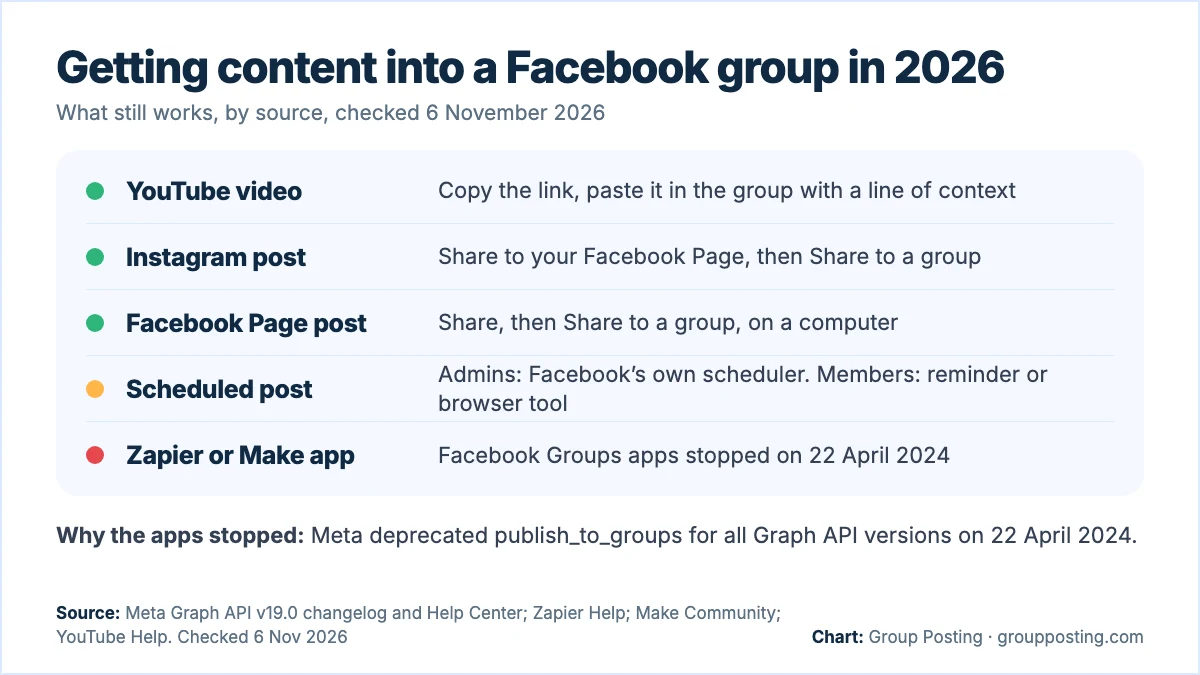
Integrations that posted to Facebook groups through Meta’s Groups API stopped on 22 April 2024, when Meta’s permission change applied to all versions, and Zapier’s and Make’s group apps ended that day. What still works: YouTube’s Copy link, Instagram sharing to your Page, sharing a Page post into a group, Facebook’s own scheduler and browser-based tools.
Checked on 6 November 2026 against Meta’s developer changelog and Help Center, Zapier Help, Make’s community notice and YouTube Help. Developers who want the permission details should read our Facebook Groups API guide; this page is for people who want their videos, posts and links to reach their groups.
Facebook groups integrations: what stopped, and when
Meta’s Graph API changelog for version 19.0 deprecated two Groups API permissions, publish_to_groups and groups_access_member_info, and the ability for group admins to install apps on their group. It applied to version 19.0 first and to all versions on 22 April 2024 (Meta: Graph API v19.0 changelog). Automation platforms that relied on the Groups API had to stop:
| Integration | What happened | Date |
|---|---|---|
| Meta Graph API | publish_to_groups and groups_access_member_info deprecated; admins can no longer install apps on groups | All versions from 22 April 2024 |
| Zapier, Facebook Groups app | No new workflows; existing ones stopped; view-only access for a month | 22 April 2024, view-only until 22 May 2024 |
| Make, Facebook Groups app | Discontinued; no new scenarios, then existing scenarios stopped | 16 April 2024, then 22 April 2024 |
Zapier added that the newer Groups API has no direct replacements for the triggers and actions people had used, so workflows had to change (Zapier: Facebook Groups app removal). Make gave the same reason, the deprecation of the Groups API, when it announced the end of its app (Make Community: Facebook Groups discontinued). So a guide that tells you to connect a group in Zapier or Make is out of date.
How to share a YouTube video to a Facebook group
The dependable route uses the video link: YouTube documents copying it, and Meta documents starting a post in a group. On a computer (YouTube Help: share videos, Meta Help: post in a group):
- Start watching the video on youtube.com and click Share under it.
- Click Copy to copy the link. To start at a moment, tick Start at and enter the time first.
- Go to facebook.com/groups and select your group.
- Click Write something…, paste the link and add a line on why it matters to this group.
- Post, then check whether it is live or waiting for approval.
YouTube’s share panel also offers social network icons, including Facebook. Its help page says the icon shares the video there but doesn’t say whether you can pick a group, so the copied link is the route we can describe step by step. Write a short introduction for each group rather than pasting the bare link, so members know why you shared it.
How to get an Instagram post into a Facebook group
Instagram can share your feed posts to Facebook, one at a time or automatically, from the Instagram app on Android or iPhone once both accounts are in the same Accounts Center (Meta Help: share Instagram posts to Facebook):
- One post: before sharing, tap Also share on…, turn on your Facebook Page and share.
- Every post: in Accounts Center, open Connected experiences, then Sharing across profiles, and turn on Your Instagram posts.
Those posts land in your Facebook Feed and profile or on your Page. Meta’s page doesn’t mention groups as a destination, so the group step is manual: open the Facebook post, click Share, select Share to a group and pick the group (Meta Help: share a post). Meta notes that you can only share to people who were in the original audience, so check who can see the post first. It also says content created on Instagram can only be seen in the Facebook app for iPhone and Android at this time, so plan the group share from your phone.
How to get Page posts into a group
If your content starts on a Facebook Page, Meta’s steps on a computer are: switch into the Page, click Share below the post, select Share to a group, pick the group, add optional text and click Post (Meta Help: Page post to a group). The phone version of that page sends you to a computer. The group must also let your Page take part; our guide to posting in a group as a Page explains how to check.
This route is manual. The Page post itself can be scheduled in Meta’s own tools (Meta Help: schedule Page posts), so it can be planned even when the group share can’t.
Scheduling posts for groups without an integration
If you searched for a “schedule Facebook groups integration”, one of these three routes will fit:
| You are | Route | What happens at the time |
|---|---|---|
| A group admin or moderator | Facebook’s own scheduler; admins can also add recurring posts in Admin Assist | Facebook publishes the post |
| A member using Buffer | Buffer’s notification publishing | Your phone reminds you and you finish the post |
| A member who wants it posted for them | A browser extension | It posts from your signed-in browser, if Chrome is open |
For admins, Meta’s steps are: open the group, click Write something…, write the post, click Calendar next to Post, choose the date and time and click Schedule (Meta Help: schedule group posts). Buffer explains its reminder method in its own help, and our guide can Buffer post to Facebook groups? walks through it.
Where browser-based tools fit
An integration platform connects apps through their APIs, so it can only do what those APIs allow. A browser extension instead works inside the Facebook session you are already signed in to, which is how it can post in the groups you have joined without the deprecated permission. The trade-off is that your browser has to be open and your computer awake and online when the post goes out.
Group Posting is one of these tools. It posts as you, or as a Page you manage where the group allows Pages, one group at a time with a pause between groups, and shows the result for each group, including posts that wait for admin approval. It uses your existing session rather than your password (how Group Posting handles your account). A link to your newest video or product page can go into a saved post and out to your groups on a schedule; see the auto poster and scheduler.
Five questions to ask any tool that promises group posting
| Question | Why it matters |
|---|---|
| Does it post through Meta’s API? | The group-publishing permission was deprecated for all versions on 22 April 2024 |
| Does someone need to be there? | A reminder still needs a person to finish the post |
| Where does the posting happen? | A tool in your own browser needs it open and the computer awake |
| Does it respect each group? | Rules, post types and admin approval still apply to every post |
| Does it show the result per group? | “Sent” is not “live” when a group reviews posts first |
One more habit matters more than any tool: vary the words for each group. Meta’s spam policy lists repetitive content as a sign of spam (Meta Transparency Center: Spam), and our guide to sharing a post to multiple groups shows how to adapt one message for several groups.
Frequently asked questions
Can Zapier post to a Facebook group?
Not with its Facebook Groups app. Zapier says the app stopped working on 22 April 2024, after Meta’s Groups API change, and that the newer API has no direct replacements for the old triggers and actions.
Does Make have a Facebook Groups integration?
Make discontinued its Facebook Groups app. Its notice said new scenarios couldn’t use the app after 16 April 2024 and that scenarios with those modules would stop working after 22 April 2024.
How do I share a YouTube video in a Facebook group?
On YouTube, click Share under the video and copy the link. Then open the group on Facebook, click Write something, paste the link, add a sentence on why it matters to that group and post.
Can Instagram posts go straight to a Facebook group?
Meta’s Instagram sharing steps send posts to your Facebook profile or Page, and the page doesn’t mention groups. Share to Facebook first, then share that post into the group from the Facebook phone app, if its audience allows it.
Can new YouTube videos post to a Facebook group automatically?
Not through the Zapier or Make group apps any more. Group admins can schedule a post with the video link in Facebook’s own scheduler, and members can use a browser tool that posts from their signed-in browser.
Why did Facebook group integrations stop working?
Meta’s Graph API version 19.0 deprecated the Groups API permissions publish_to_groups and groups_access_member_info, and the ability for admins to install apps on groups, applying to all versions on 22 April 2024.
Is there an official way to schedule Facebook group posts?
Yes, inside the group. Admins and moderators can schedule posts with the Calendar button, and admins can set up recurring posts in Admin Assist. Both work on Facebook itself, in the group.
Sources
- Meta for Developers: Graph API changelog, version 19.0, checked 6 November 2026.
- Zapier Help: App update: Facebook Groups app removal, checked 6 November 2026.
- Make Community: Facebook Groups will be discontinued due to API deprecation, checked 6 November 2026.
- YouTube Help: Share videos and channels (computer), checked 6 November 2026.
- Facebook Help: Post in a Facebook group, checked 6 November 2026.
- Facebook Help: Share your Instagram posts to Facebook, checked 6 November 2026.
- Facebook Help: Share a post you see on your Feed on Facebook, checked 6 November 2026.
- Facebook Help: How to share a post from your Facebook Page to a Facebook group, checked 6 November 2026.
- Facebook Help: Schedule a post or set up recurring posts in a Facebook group you manage, checked 6 November 2026.
- Facebook Help: Schedule a post and manage scheduled posts for your Facebook Page, checked 6 November 2026.
- Meta Transparency Center: Spam, checked 6 November 2026.
Part of Facebook group automation, AI and the API, our topic page with every guide on this subject. Start with the main guide: Facebook Group Automation: Tasks, Permissions and Workflow.
For the group-publishing part of your workflow, explore Auto poster and scheduler, or compare plans on Group Posting pricing.