Facebook Page vs Group for Business: Which to Start?
- Facebook groups
- Business Pages
- Marketing planning

Start with a Facebook Page when your business needs a clear place for its information and updates; start a group when people have a recurring reason to discuss a shared problem and you can host that discussion. If you mainly want to meet relevant local people, contributing to existing groups may be a better first step than creating your own. A Page and a group can work together, but each needs a separate purpose and someone responsible for keeping it useful.
This guide compares the three choices, gives you a workload worksheet and sets out a 14-day decision pilot. Sources were checked on 31 October 2026.
Facebook Page vs group: what the evidence says about reach and admin work
The evidence supports planning for both an audience and an operating workload. It does not establish that either a Page or a group will bring more enquiries for your business.
- Facebook has broad US adoption: Pew Research Center’s November 2025 report found that 71% of US adults used Facebook. Its representative survey covered 5,022 adults from February to June 2025; this measures platform use, rather than interest in a particular business.
- Page work can be divided: Meta’s January 2021 Pages announcement described task-based permissions with full or partial access. That historical description supports assigning responsibility, while current controls need checking in your account.
- Groups have their own feedback tools: Meta’s March 2022 group-admin announcement described a mobile insights summary for growth and engagement. Use available group measures alongside the time spent hosting.
- Moderation is substantial work: Meta reported in June 2021 that more than 70 million admins and moderators ran active groups worldwide. That is a historical admin/moderator count, not a count of groups or potential customers.
For the decision below, treat the survey as audience context and the Meta announcements as dated descriptions of responsibilities and tools. Check present availability before designing your routine around a feature.
1. Give each channel a job
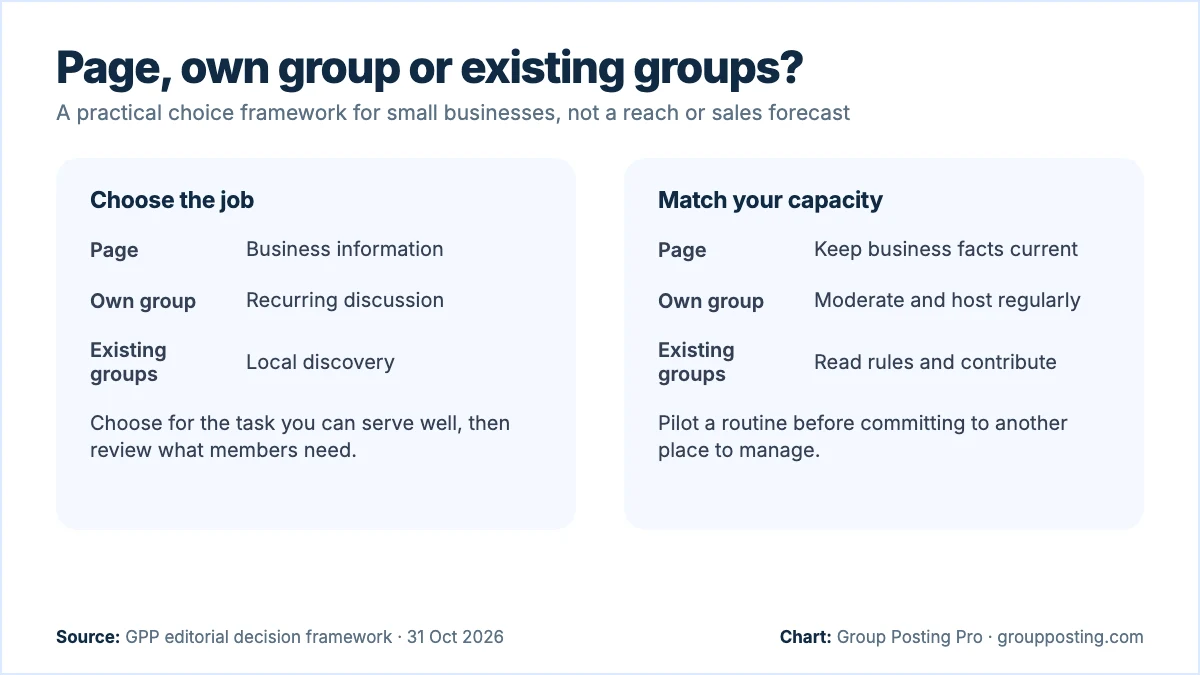
The useful question is what a visitor should accomplish. On a business Page, your editorial priority can be a clear identity, an accurate service description and current updates. In your own group, the priority is a useful exchange between members. In someone else’s group, it is contributing to a conversation that already has its own purpose.
These are planning roles, not claims that one Facebook format gets more reach. A Page can host conversations, and a group can carry an announcement. Choose the main job first so that you can judge whether the extra work is worthwhile.
Meta’s 2021 introduction to the Pages experience described public information, posts, conversations and Page management tools. That history helps explain why a Page is more than a noticeboard; it does not establish which controls your account displays today. Check your own Page before promising a particular contact or booking route.
A group creates an additional hosting obligation. Meta’s Pages, Groups and Events Policies describe admins as community leaders and caretakers, with responsibility for content they create or permit. Having an audience to sell to is therefore an incomplete reason to start one. Write down what members would gain even if they never bought anything.
Illustrative purpose test: a bicycle repair business could maintain a Page for opening updates and repair information, contribute relevant answers in local groups, and consider its own maintenance group only if riders want recurring help. Those are possible choices, not a customer story or a prediction of demand.
2. Compare the three choices
Use this matrix as an editorial framework. The responsibilities shown are choices for your operating plan, rather than an exhaustive list of Facebook features. You do not need to launch all three activities to have a complete marketing plan.
| Choice | Best job to assign it | Work to budget | Reason to wait |
|---|---|---|---|
| Business Page | Explain the business and keep its public information current. | Check facts, publish relevant changes and answer incoming questions. | You cannot maintain accurate details or respond to the contact route you advertise. |
| Your own group | Host recurring discussion around a specific shared need. | Set the purpose, moderate, welcome members and answer unresolved questions. | The only planned content is your offers, or nobody can host the discussion. |
| Existing groups | Learn local questions and contribute where the rules permit. | Read each group, check permissions and write context-specific contributions. | The audience is unrelated, or the permitted activity does not fit your offer. |
Separate creating a group from acting as a Page inside a group. They are different decisions. Our guide to posting in a group as a Page covers identity and permission checks. This article helps you decide whether you need a community to administer in the first place.
3. Check your capacity before creating a group
Start with your working week. Reserve time for incoming questions before allocating time to new content. A calendar full of prepared posts is little help when a member asks a reasonable question and nobody answers. Name a backup person or reduce what you promise when you are away.
For a Page, list the facts that can change: service area, opening arrangements, available services and the next step for an enquiry. Give each fact one place to verify it, such as your own current booking page. A short, accurate update is more useful than a frequent post built around outdated information.
For your own group, write a moderation brief before an invitation. Include the group’s purpose, what belongs elsewhere, whether commercial posts are welcome and how members should raise a concern. Decide who checks submitted posts and unanswered discussions. Do not advertise personalised support if the business cannot provide it consistently.
For existing groups, keep a small destination record: URL, audience, permitted identity, promotion format, permitted link placement and date last checked. Read actual discussions to confirm fit. A large membership count does not tell you how many people need your service or will see your contribution.
Meta’s policy also requires notice and explicit consent when you collect information from people interacting with a Page, group or event, and says you must make clear that you are collecting it. Treat joining a group and subscribing to business emails as separate choices. Avoid asking people to publish private contact details in a discussion.
4. Use a decision worksheet
Write one sentence for each of the following prompts. If the answer is vague, revise the plan before opening another channel. This worksheet is our planning method; it is not a platform requirement or a scoring system validated by a study.
- Visitor task: What should someone be able to learn, ask or do here? Name one task, such as finding repair availability or comparing maintenance routines.
- Return reason: Why would the same person come back next month? A changing menu may support updates; repeated skill questions may support discussion.
- Contribution: What can members usefully add? If every answer must come from your business, a clear information page may be enough.
- Operating owner: Who checks accuracy, replies and moderation, and when? Record a realistic review window rather than promising constant availability.
- Optional next step: How can an interested person enquire without making participation depend on buying?
- Stop condition: What would make you reduce, pause or change the activity? Examples include unanswered questions, poor audience fit or more work than you allocated.
Choose a Page-first approach when information is the main gap. Choose existing-group participation when you need to learn what an audience asks. Consider your own group when you can name both a recurring member need and a sustainable hosting routine. There is no requirement to graduate from one choice to another.
5. Run a 14-day decision pilot
Use two weeks to test the work, not to declare a winner on sales. The numbers below are an illustrative workload for a small business, not recommended Facebook posting limits or a forecast. Adjust them to actual group rules and the time you have.
- Days 1–2: fix the information gap. Review your business description and contact route. Prepare one accurate explanation of your service and one answer to a common practical question.
- Days 3–4: inspect three relevant groups. Record their purpose and rules. Note recurring questions without copying members’ personal details into a marketing list. Skip destinations where the audience or permitted activity does not fit.
- Days 5–7: make two useful contributions. Answer actual questions where business participation is permitted. Identify your relationship to the business. If a permitted promotional thread fits, adapt one contribution for it instead of publishing an extra offer.
- Days 8–10: draft an own-group brief. Write the member promise, three discussion topics and a moderation routine. Ask willing existing contacts whether those topics would be useful through a channel they already use with you; do not add them to a group unasked.
- Days 11–12: test the workload. Draft a welcome note, a discussion prompt and a response to an off-topic post. Time the work and include the likely time needed to answer the discussion.
- Days 13–14: decide. Compare what people needed with what you could maintain. Keep the Page accurate, retain suitable existing groups and launch your own group only if its separate purpose and hosting capacity are clear.
Keep a simple note after each work session: minutes spent, questions answered, questions left open and next action. Record an enquiry only when someone actually asks about your service. Do not count every reaction or discussion reply as a prospective customer.
If the pilot produces little response, review the question and destination before increasing volume. If people mainly want opening details, improve the information. If they ask the same practical question repeatedly, create a useful resource. If they want to compare experiences with each other, explore a discussion space.
6. Make a Page and a group work together
If you choose both, give them different editorial jobs. Put the definitive business explanation on your chosen business information route and use the group to explore questions. Avoid maintaining conflicting versions of dates and service details. Check both places whenever an important fact changes.
Illustrative content split: a garden service could publish its seasonal availability as a business update, while a community discusses how to prepare a small garden for winter. A commercial offer should still be described clearly. The discussion should remain useful to people who choose to do the work themselves.
Do not copy every Page update into your group as a default routine. Ask whether the members need that information and what they can discuss or do with it. A closure notice may belong in both places; a detailed discussion prompt may belong only in the community.
Keep community growth separate from this channel decision. Our guide to turning group participation into suitable enquiries deals with what happens after relevant members arrive. The broader Facebook group marketing guide covers the ongoing marketing process.
7. Review evidence rather than member totals
Give every channel a review question that matches its job. For the Page, ask whether people can understand the offer and reach the advertised contact route. For your own group, ask whether useful questions receive answers and members contribute relevant experience. For existing groups, ask whether your contributions belong and lead to worthwhile conversations.
Use one review period and keep the categories separate: work completed, visible responses, voluntary enquiries and actual purchases. Record minutes alongside outcomes. A channel with more comments can still require more work than your business can sustain, while a quiet information page can answer a visitor’s question without a public reaction.
Attribution will be incomplete. Someone may read a group answer and later search for your business. Ask how an enquirer found you when appropriate, and retain an unknown category. Choose the next month’s work from observed needs, capacity and honest records, rather than assuming either Pages or groups always perform better.
Frequently asked questions
Should a new business start a Facebook Page or a group?
Start with the information people need to understand and contact the business. Consider your own group when you can name a recurring discussion need and provide moderation. Existing groups can help you learn the audience before taking on that work.
Can I use a Page and a group together?
Yes. Assign each a purpose and keep business details consistent. A useful split is business information and updates on the Page, with member questions and shared discussion in the group.
Do I need my own group to market locally?
No. You can contribute to relevant existing groups where their rules permit your activity. Check audience fit, permitted identity, format and link rules before preparing a post or reply.
How much time should I budget for a business group?
Measure a small pilot rather than using a universal allowance. Include moderation, welcome work, unanswered questions and follow-up, as well as writing posts. Reduce your promise if you cannot sustain those responsibilities.
Which choice is more likely to bring enquiries?
There is no universal result. Compare suitable enquiries and the work needed over a consistent period. A clear Page, a useful community and thoughtful participation in existing groups solve different problems.
Sources
- Meta: Pages, Groups and Events Policies, admin responsibilities and data collection requirements, checked 31 October 2026.
- Meta Newsroom: Introducing the New Pages Experience, 6 January 2021, historical context checked 31 October 2026.
- Group Posting Pro: group management, product workflow and plan allocation, checked 31 October 2026.
- Pew Research Center: Americans’ Social Media Use 2025, 20 November 2025; checked 31 October 2026.
- Meta: New Tools to Help Group Admins Protect, Manage and Grow Their Facebook Groups, 9 March 2022, page also shows 22 March 2022 update; checked 31 October 2026.
- Meta: New Tools to Help Group Admins Manage Their Communities, 16 June 2021, page also shows 14 March 2022 update; checked 31 October 2026.
Part of Facebook group marketing and leads, our topic page with every guide on this subject. Start with the main guide: Facebook Group Marketing: A Practical Business Guide.
For the group-publishing part of your workflow, explore Group management, or compare plans on Group Posting pricing.